Features FAQ Support Contact Legal
Now Available on iOS

Reprogram Your
Mind & Soul.

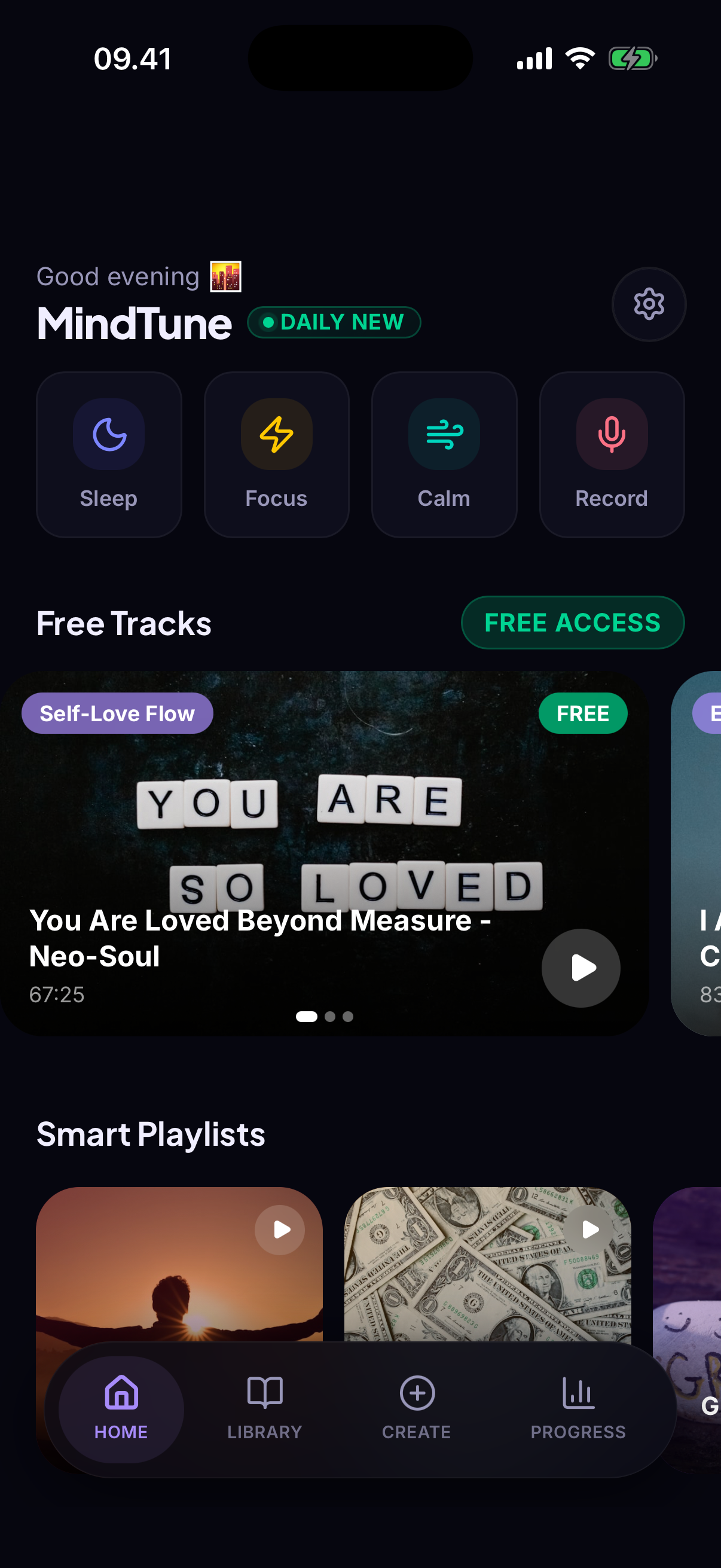
Combine powerful affirmations with binaural beats and healing sounds to transform your subconscious — while you work, rest, or sleep.

MindTune app screenshot
8
Goal Categories
15+
Affirmation Tracks
14
Background Sounds
Daily Streaks
Features

Everything you need to
transform your mind

A complete toolkit for mental reprogramming — built around science-backed audio and daily ritual.

8 Goal Categories

Choose from Confidence, Sleep, Focus, Anxiety relief, Wealth mindset, Self-Love, Productivity, and Gratitude. Personalized from day one.

Binaural Beats & Nature Sounds

14 background sounds including Alpha, Theta, Delta waves, rain forest, ocean tides, Tibetan bells, and brown noise.

AI Affirmation Creator

Generate personalized affirmations with AI — tailored to your goals, tone, and daily rituals for maximum impact.

Sleep Mode

Auto-fade timer that gently reduces volume as you drift off. Bedtime affirmations designed to reprogram your mind overnight.

Custom Voice Mixer

Mix voice volume with background sounds independently. Find your perfect balance between guided affirmations and ambient audio.

Progress & Streaks

Track your daily listening streaks, total minutes, and consistency. Build unstoppable momentum with visual progress tracking.

FAQ

Frequently Asked Questions

Everything you need to know about MindTune.

How do affirmations actually work?
Affirmations work through neuroplasticity — repeated positive statements rewire neural pathways over time. Combined with a relaxed state (which binaural beats help induce), your subconscious mind becomes more receptive to new belief patterns.
What are binaural beats?
Binaural beats are created when two slightly different frequencies are played in each ear. The brain perceives a third tone — the difference. Alpha (8–13 Hz) supports focused calm, Theta (4–8 Hz) promotes deep relaxation, Delta (0.5–4 Hz) encourages deep sleep.
Does MindTune work offline?
Yes! All affirmation content, background sounds, and core features are fully available without internet. Only the AI affirmation creator requires a connection.
How long should I listen each day?
10–20 minutes in the morning and 10–20 minutes before sleep for best results. Consistency matters more than duration — even 10 minutes daily beats a 2-hour session once a week.
Can I cancel my subscription anytime?
Yes. Cancel anytime through iOS Settings → Apple ID → Subscriptions. Access continues until the end of the billing period. No questions asked.
Is there a free trial?
MindTune does not currently offer a free trial. Plans: Monthly $6.99/mo or Annual $29.99/yr (save 64%).
How do I restore a previous purchase?
Open MindTune, go to the subscription screen, and tap "Restore Purchase." Make sure you're signed in with the same Apple ID used for the original purchase. Contact moryosatur@gmail.com if issues persist.
Troubleshooting

Having an issue?

Common problems and how to fix them quickly.

No audio playing

If you can't hear sound when playing tracks:

1
Check device volume and ringer switch
2
Check Bluetooth headphone connection
3
Close and reopen the app
4
Restart your iPhone

Notifications not appearing

If daily reminders aren't showing:

1
Go to Settings → MindTune → Notifications
2
Enable "Allow Notifications"
3
Toggle reminders off and on in the app

Subscription not recognized

If the app shows you're not subscribed:

1
Tap "Restore Purchase" on the paywall screen
2
Ensure you're signed into the correct Apple ID
3
Check subscription in iOS Settings → Apple ID

AI affirmations not generating

If the AI creator isn't working:

1
Check your internet connection
2
Try a shorter, more specific prompt
3
Wait a moment and try again (rate limits)

App crashes or freezes

If MindTune becomes unresponsive:

1
Force close (swipe up from app switcher)
2
Reopen and try again
3
Update from the App Store
4
Restart your device

Progress not saving

If streaks or history aren't being recorded:

1
Don't force-close while a track is playing
2
Ensure the device has free storage space
3
Contact support if data is consistently lost
Contact Us

We're here
to help

Questions, feedback, or issues? We'll get back to you within 24 hours.

Email Support

moryosatur@gmail.com

Response Time

Usually within 24 hours

Platform

iOS (iPhone & iPad)

Message sent!

We'll reply to your email within 24 hours.